I finally got a chance to read (watch) the Google Chrome Summit videos. Very insightful!
Showing posts with label app development. Show all posts
Showing posts with label app development. Show all posts
Friday, January 7, 2022

Wednesday, March 18, 2020
GitHub's mobile app - finally!
I'm so glad to finally see this. Downloaded and will be trying it out. I remember downloading a mobile GitHub app years ago (like 2016) and not being impressed. A few of the apps I tried were just frustrating because I didn't want to see everyone's feed but just my own updates for personal reasons.
Anyhow, let's see how smooth this operates over mobile. Thanks, GitHub team!
https://github.blog/2019-11-13-universe-day-one/#mobile

Anyhow, let's see how smooth this operates over mobile. Thanks, GitHub team!
https://github.blog/2019-11-13-universe-day-one/#mobile

Tuesday, May 28, 2019
Review: NativeScript, Flutter, and other mobile app dev tools
I'm just now learning about NativeScript and am impressed. So what other programming languages and development tools for mobile development have I been missing?
Well, I heard of Flutter, but how does this compare with NativeScript? I hear both of these can be used to developed mobile apps for both, Android and iOS.
Of course, one advantage that Flutter is proclaiming is their ability to show the app not just on mobile devices, but on desktops and all other devices. So, an app developed with Flutter will display beautifully on a computer and tablet just as much as a smartphone or iPhone. Flutter is also backed by Google whereas NativeScript is backed by the open source community (which gives an advantage for Apple developers and perhaps non-Googlers too).
Here's a quick snippet from the article that I found very useful.

Whether or not the framework is best among the others is something that I think is debatable and also depends on who the main targeted audience is. Do most of my users use an iPhone? If so, then I'm most likely focused on which framework produces that best look on an iPhone and secondly on other smartphones. If the app that I'm developing is primarily for Facebook users, then I'm going to heavily consider developing using ReactNative. So, I think the choice lies with the user-base and not the developers.
Well, I heard of Flutter, but how does this compare with NativeScript? I hear both of these can be used to developed mobile apps for both, Android and iOS.
Of course, one advantage that Flutter is proclaiming is their ability to show the app not just on mobile devices, but on desktops and all other devices. So, an app developed with Flutter will display beautifully on a computer and tablet just as much as a smartphone or iPhone. Flutter is also backed by Google whereas NativeScript is backed by the open source community (which gives an advantage for Apple developers and perhaps non-Googlers too).
NativeScript
Well, let's hear the introduction for using NativeScript.Flutter
Now, let's hear the introduction for using Flutter.Learn More - Different App Tools
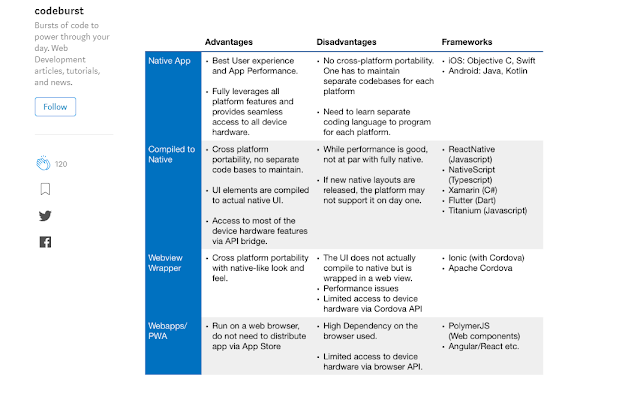
To learn more about the different tools for developing cross-platform applications, I found this article to be insightful. No need to repeat what someone else has already searched and reported on, right?Here's a quick snippet from the article that I found very useful.

Whether or not the framework is best among the others is something that I think is debatable and also depends on who the main targeted audience is. Do most of my users use an iPhone? If so, then I'm most likely focused on which framework produces that best look on an iPhone and secondly on other smartphones. If the app that I'm developing is primarily for Facebook users, then I'm going to heavily consider developing using ReactNative. So, I think the choice lies with the user-base and not the developers.
Awesome Table Summary by CodeBurstIO

Mobile App Development for non-Developers
There are also plenty of platforms for non-developers to use in developing a mobile application. I have add these in the references below.Reference
- https://www.nativescript.org/
- https://flutter.dev/
- https://mashable.com/article/build-mobile-apps/
- https://www.techworld.com/picture-gallery/apps-wearables/best-mobile-application-development-platforms-tools-3375307/
- https://codeburst.io/react-native-vs-nativescript-vs-xamarin-vs-flutter-vs-ionic-vs-cordova-vs-pwas-196810954450
google "app development for developers"
Tuesday, April 23, 2019
Review: Microsoft's New Programming Language - Bosque
Microsoft has another new programming language, huh? Bosque. If a community supports this, then I'll start to pay attention. Else, there are just so many other programming languages out that a developer should continue to focus on like C#, C++.


Read Article
https://www.theregister.co.uk/2019/04/18/microsoft_bosque_programming_language/References
- https://github.com/Microsoft/BosqueLanguage
- https://hackernoon.com/best-coding-languages-to-learn-in-2019-b49b49250a25
- https://www.geeksforgeeks.org/top-10-programming-languages-of-the-world-2019-to-begin-with/
- https://codinginfinite.com/best-programming-languages-to-learn-2019/ (F#)
Wednesday, April 10, 2019
Review: Facebook's Aroma ML for Code Recommendation
I actually don't need to say much here except you should also read this article.
https://ai.facebook.com/blog/aroma-ml-for-code-recommendation/
Fascinating and useful!
I definitely have my days where I find myself digging through too many StackOverflow (or other Developer Forum sites) to find great coding answers to my problems. Thank you, Facebook!
https://ai.facebook.com/blog/aroma-ml-for-code-recommendation/
Fascinating and useful!
I definitely have my days where I find myself digging through too many StackOverflow (or other Developer Forum sites) to find great coding answers to my problems. Thank you, Facebook!
Friday, April 5, 2019
Resolve: Killing Zombie Processes created by Selenium
Problem
Here's my problem.I'm working with Selenium 2.53 (an old version, I know) and Firefox 52.8. The Gecko (driver) version is whichever works with FF 52.8. Anyhow, I create a my test script, run the test script, and see the command invokes the call to run the test. However, my browser does not open. My terminal just sits at this command running the test. Eventually, my command ends and the test failed to run. I'm running this in a secure environment on a separate machine and can't copy/paste a screenshot here.
However, here's what the error looks like - if you're lucky enough to get one.
Results :
Tests in error:
my.test.script.TestPageAUT.enterMaxChars...
Run 1: .... >> WebDriver Unable to bind to locking port 70...
Solution
Here's my solution.I knew from experience that a system process opened by the driver via Java is hanging. Since I'm running this on Linux, I had to make sure I used the right Linux commands to find the processes that are running (active). Throughout my research, I learned that Linux actually has processes that are zombies (not quite dead, but not live either) which are marked with "<defunct>" next to the process.
Once I found out the process ID (PID) of the zombie process, then I just needed to kill the parent process of the zombie (because I can't kill the zombie - which I think is weird). It would be nice to just kill the zombie and automatically the parents of the zombie also die. Anyhow, in this particular case I had to kill the most super parent of the zombie in order to completely make sure the zombie process for my selenium script is dead. Selenium runs via Java by triggering the gecko driver which controls a FF process. So, to kill the zombie FF process, need to kill the Java process controlling the zombie FF process which might have a grandparent Java process.
Double check the process is dead by showing the list of active processes and seeing that there is no zombie process in the list.
Steps/Commands
Here's how I did it.Important Note: A "kill" command has no effect on a zombie process.
List all zombie processes (ID).
$ ps aux | grep -w Z
Find the parent PID.
$ ps -o ppid <defunct_PID>
Kill the parent
$ kill -9 <parent_PID_of_defunct_PID>
Other Useful Commands
List all running processes.$ ps
List the running processes with Firefox.
$ ps -A | grep firefox
For more details, list with these parameters.
$ ps aux | grep firefox
Find the parent process ID.
$ ps -o ppid= -p <defunct_PID>
$ ps -A | grep firefox
For more details, list with these parameters.
$ ps aux | grep firefox
Find the parent process ID.
$ ps -o ppid= -p <defunct_PID>
You can try this (kill all firefox PIDs), but this didn't work for me.
$ kill $(pgrep firefox)
$ kill $(pgrep firefox)
Reference
- https://stackoverflow.com/questions/16944886/how-to-kill-zombie-process (3rd answer, particularly)
Thursday, March 28, 2019
Review: Fall and Rise of Dart
If you are a current iOS or Android developer, you may face a bit of a learning curve if you choose to embrace Flutter. However, it might be worth the jump—both for hot reload (an awesome feature), and for the opportunity to work cross-platform. - David Bolton
Read Article
Read Article
This is especially attractive to read (or hear) after watching the "Highlights from Flutter at World Mobile Congress 2019"
Wednesday, March 20, 2019
Review: Amazon Software Development Insights
How is software developed at Amazon?
There are some really good tips in this online video and article.http://highscalability.com/blog/2019/3/4/how-is-software-developed-at-amazon.html
Monday, March 4, 2019
Review: Rewriting in Rust Article
This was a good article to read based on the Rust hype and rewriting apps in Rust. Thank you, Diane!
https://hacks.mozilla.org/2019/02/rewriting-a-browser-component-in-rust/
https://hacks.mozilla.org/2019/02/rewriting-a-browser-component-in-rust/
Monday, December 17, 2018
Examining Value of Tests
Some valuable points made in this article. One thing I see missing is the accountability for those who collect user requirements and delivers requirements to the Development Team for implementation. Sometimes, the issue isn't as much as the development as it is the requirement(s) and product design. These metrics should also be collected (as defects in requirements) instead of counted towards bugs or issues in development.
https://blog.testproject.io/2018/12/04/how-do-i-know-my-tests-add-value/
https://blog.testproject.io/2018/12/04/how-do-i-know-my-tests-add-value/
Wednesday, December 12, 2018
Tuesday, September 4, 2018
True "Agile Development"
Devs,
I'm not going to say much since some developers have the tendency to talk in circles on certain topics like "what is Agile". Instead, I am posting an article that I just read and totally agree with (who is actually one of the founders of the Agile Manifesto). I actually took part in this "experimental" phase when it came out with my first corporate job in Minnesota. From there, I've been on teams in Boston and in DC. There has only been one other team which was a Boston, small business that worked close to the principles of Agile. This is perhaps because the CTO was co-founder of the business.
Therefore, I'm realizing that for an organization to truly be Agile, one of the co-founders must be extremely technical if not a co-founder/CTO.
https://martinfowler.com/articles/agile-aus-2018.html
I'm not going to say much since some developers have the tendency to talk in circles on certain topics like "what is Agile". Instead, I am posting an article that I just read and totally agree with (who is actually one of the founders of the Agile Manifesto). I actually took part in this "experimental" phase when it came out with my first corporate job in Minnesota. From there, I've been on teams in Boston and in DC. There has only been one other team which was a Boston, small business that worked close to the principles of Agile. This is perhaps because the CTO was co-founder of the business.
Therefore, I'm realizing that for an organization to truly be Agile, one of the co-founders must be extremely technical if not a co-founder/CTO.
https://martinfowler.com/articles/agile-aus-2018.html
- Get rid of the Agile Industrial Complex and the idea of imposing stuff on teams. Let teams work out the way they should work themselves.
- Raise the importance of technical excellence, and never forget that when writing software, the technology side is really vital, and
- organize around products.
One area I wish Martin would have highlighted is the importance of "smart users". That is, users are who are aware of how to develop their product to make life easier. I don't mean easier like "make a better car" but visionary like "make a self-driving car". That kind of vision (which requires an imagination - thanks GE) is the kind of easier I'm referring to. Somehow, I thought with more people using all of these gadgets that people would become more creative. I'm still waiting to witness, hahaha.
Enjoy the ride!
Wednesday, May 3, 2017
Frameworks over Languages?
I recently read this article:
http://www.kdnuggets.com/2017/05/frameworks-offer-data-scientists-programming-languages-lack.html
What a mind opener and so true (to a degree, but a high degree)! Why bother with languages that a person has to learn and do all kinds of stuff, when one can leverage a framework and - viola! - create something rapidly? Ruby-on-Rails is a great example. Perhaps it's why it's one of the most useful RAD frameworks. Of course, there are cases when a person will not want to use a framework (or find one that more-so matches the product development's purpose). For example, if you need to customize a lot instead of following conventions, then Rails is not for you. Spring might be a better match, but that involves switching languages. I haven't researched and played with all the different Ruby frameworks, but perhaps there is one that is more flexible and customizable?
Either way, know the frameworks and don't dig too deep into the languages UNLESS you must use the specific language to accomplish your goal.
Good luck,
G2
http://www.kdnuggets.com/2017/05/frameworks-offer-data-scientists-programming-languages-lack.html
What a mind opener and so true (to a degree, but a high degree)! Why bother with languages that a person has to learn and do all kinds of stuff, when one can leverage a framework and - viola! - create something rapidly? Ruby-on-Rails is a great example. Perhaps it's why it's one of the most useful RAD frameworks. Of course, there are cases when a person will not want to use a framework (or find one that more-so matches the product development's purpose). For example, if you need to customize a lot instead of following conventions, then Rails is not for you. Spring might be a better match, but that involves switching languages. I haven't researched and played with all the different Ruby frameworks, but perhaps there is one that is more flexible and customizable?
Either way, know the frameworks and don't dig too deep into the languages UNLESS you must use the specific language to accomplish your goal.
Good luck,
G2
Thursday, April 13, 2017
Electron - Quick Introduction (destop app in JS)
Hey Dev Fam,
I wanted to know what "Electron" was and went through these tutorials.
Happy Coding,
G2
I wanted to know what "Electron" was and went through these tutorials.
Red Stapler's quick tutorials on Electron
Introduction & WebApp -> DesktopApp Quick Conversion
https://www.youtube.com/watch?v=1Qf2Yjz-zskHello World
https://www.youtube.com/watch?v=sJFuMKPfpfsPackaging Application
https://www.youtube.com/watch?v=rP7j_hDL40YAnother Overview on Electron
https://www.youtube.com/watch?v=mr9Mtm_TRpwGitHub's Electron Overview 2016
https://www.youtube.com/watch?v=FNHBfN8c32UGitHub's selling point on using Electron is:
If you can build a website, you can build a desktop app. Electron is a framework for creating native Desktop applications with web technologies like JavaScript, HTML, and CSS.Happy Coding,
G2
Subscribe to:
Posts (Atom)