Hey Dev Fam,
I just read this article on cloud performance between AWS and Digital Ocean. The title caught my attention because AWS is quite strong in the cloud computing arena. For any author to mention how a specific vendor is trying to catch up, I'm interested in knowing.
https://content.nanobox.io/aws-vs-digital-ocean-a-performance-comparison/
After reading the article, I'm glad to see such thorough steps and results. The author did a great job. I'll have to look into these new tools like Siege. Too bad Digital Ocean didn't decrease their cost with respect to their performance. I see they kept their cost too close to AWS but their performance is not as close as it should be (in making a good case for keeping their cost close).
Anyhow, since I never heard of Nanobox.io I wanted to learn more. After watching the demo, I still wasn't sold on using it. I've used Vagrant and still need to learn Docker, but what's truly different about Nanobox besides it's fancy client UI and dashboard stuff?
Well, check this out this Nanobox demo:
https://www.youtube.com/watch?v=TV4iBxytfyE
I'll need to try this out and let you know what I think...
Happy Coding,
G2
Thursday, April 13, 2017

Monday, March 13, 2017
Keeping up with Programming Languages
It's always tough to keep up with all the programming languages and to know which one is the best for the year. I use to think certain languages would die, but many still are surviving like Java. I like this article though and agree. Best bet is to securely know the fundamentals of programming and then learn a few well while staying aware of the basics for other programming languages. Thank goodness for the quick tutorials on YouTube (in addition to Google+StackOverflow)!
Tuesday, January 17, 2017
CSM's Passcode project
Article of the Week:
https://www.theatlantic.com/technology/archive/2016/10/how-hackers-play-capture-the-flag/505640/
I think the Christian Science Monitor's Passcode project is doing an excellent job and I look forward to seeing more news on cybersecurity, data privacy breaches, and hacking.
http://passcode.csmonitor.com/manifesto
https://www.theatlantic.com/technology/archive/2016/10/how-hackers-play-capture-the-flag/505640/
I think the Christian Science Monitor's Passcode project is doing an excellent job and I look forward to seeing more news on cybersecurity, data privacy breaches, and hacking.
http://passcode.csmonitor.com/manifesto
Thursday, November 3, 2016
News Blitz Update - Quatum browser (FF)
Sometimes I just don't have a lot of time to read. But here's my news blitz for today:
- (Quatum browser) http://www.zdnet.com/article/faster-firefox-mozillas-quantum-shoots-for-quicker-page-loads-smoother-scrolling/
- (C++) http://arne-mertz.de/2016/10/modern-c-features-user-defined-literals/
- (Dart) https://techcrunch.com/2016/10/26/googles-dart-programming-language-returns-to-the-spotlight/
- (CNKT, Machine Learning) https://techcrunch.com/2016/10/25/microsoft-launches-the-next-version-of-its-deep-learning-toolkit-into-beta/
- (Top Developers by Nations) http://www.cio.com/article/3134504/application-development/where-to-find-the-worlds-best-programmers.html
- (Open Guide to AWS) https://github.com/open-guides/og-aws
- (Popular Coding Languages) http://www.zdnet.com/article/which-programming-languages-are-most-popular-and-what-does-that-even-mean/
- (Hacking Cameras) http://krebsonsecurity.com/2016/10/hacked-cameras-dvrs-powered-todays-massive-internet-outage/
Monday, October 24, 2016
.htaccess missing from server breaks all page links except index.php
I had deployed my application from my new Mac, my first time, and got an error on AWS:
the requested URL /about was not found on this server
I struggled trying to debug my application and then figured out it had to do with my server. Which means, the issues was with my file: .htaccess
Come to find out after nobody made the following simple statement, I figured out the solution.
Tah-dah! Another problem solved!
the requested URL /about was not found on this server
I struggled trying to debug my application and then figured out it had to do with my server. Which means, the issues was with my file: .htaccess
Come to find out after nobody made the following simple statement, I figured out the solution.
- Show all hidden files on your Mac.
- Go to the directory/folder that you're zipping up to upload and deploy on ElasticBeanstalk in AWS.
- Zip up all the subfolders and files (by compressing into .zip file), but make sure the '.htaccess' file is included!
- Then upload and deploy in AWS.
Tah-dah! Another problem solved!
Wednesday, September 7, 2016
D3 - Coding with Readability and Usefulness, no more d variable
One of the things I find so irritating is the overuse of letters which lack sufficient readability (to understand code without having to dig into the back-end to gain meaning).
I'm learning and working on D3 stuff and I see many examples using the letter d. This d stands for data, obviously. BUT, almost everything in the world is a d (i.e. data). Needless to say, I had to update code to ensure better understanding and programming. Here's my example of better coding using D3.
I'm learning and working on D3 stuff and I see many examples using the letter d. This d stands for data, obviously. BUT, almost everything in the world is a d (i.e. data). Needless to say, I had to update code to ensure better understanding and programming. Here's my example of better coding using D3.
Before
groups.selectAll('text')
.data(function (d) {
console.log(d);
return d;
})
.enter()
.append('text')
.text( function (d, i) {
console.log(i);
if (typeof d === 'number')
{
console.log("data type is a number, not object...skipping.");
return;
}
console.log(d);
return d.x;
});
.data(function (d) {
console.log(d);
return d;
})
.enter()
.append('text')
.text( function (d, i) {
console.log(i);
if (typeof d === 'number')
{
console.log("data type is a number, not object...skipping.");
return;
}
console.log(d);
return d.x;
});
After
groups.selectAll('text')
.data(function (arr) {
console.log(arr);
return arr;
})
.enter()
.append('text')
.text( function (obj, i) {
console.log(i);
if (typeof obj === 'number')
{
console.log("data type is a number, not object...skipping.");
return;
}
console.log(obj);
return obj.x;
});
.data(function (arr) {
console.log(arr);
return arr;
})
.enter()
.append('text')
.text( function (obj, i) {
console.log(i);
if (typeof obj === 'number')
{
console.log("data type is a number, not object...skipping.");
return;
}
console.log(obj);
return obj.x;
});
In the After, I updated the d within the data method into "arr" as its a data array representing the dataset passed in. I updated the d within the text method into "obj" as its a data object of the data array passed in.
I hope this helps somebody.
I hope this helps somebody.
Blessings,
Thursday, September 1, 2016
Debugging - PHP + Javascript - Unexpected Token <
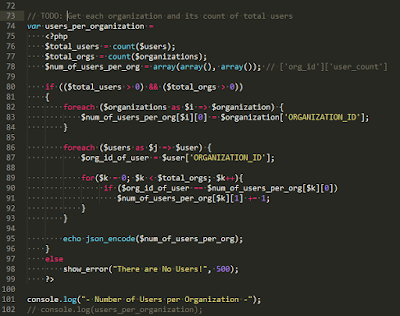
I recently came across an unusual error in the JavaScript Console when processing my PHP code into JavaScript to display in the browser. The line number provided in the console is misleading - b/c it's not the actual line number with the error. So I don't use the 'line number' information to debug.

Error

Code
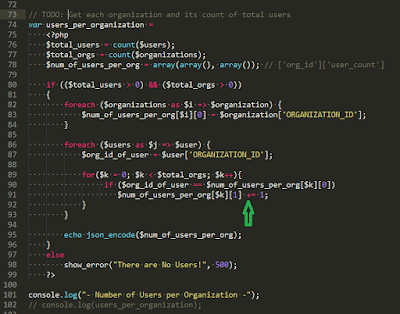
The root cause is how either PHP is calculating the 'addition assignment' operation (i.e. a += b; ) within JavaScript tags during compilation or how JavaScript is processing the PHP output before displaying to the browser. I'm not exactly sure as this would require more research and investigation on my part which I don't currently have time - yay, deadlines!

Initial Attempt
At first, I thought I needed to replace the shorthand 'addition assignment' operator into its expanded equivalent. (See the green arrow in my image below.)

The expanded equivalent would be:
a = a +b;
or according to my code:
// line 91
$num_of_users_per_org[$k][1] = $num_of_users_per_org[$k][1] + 1;
Solution
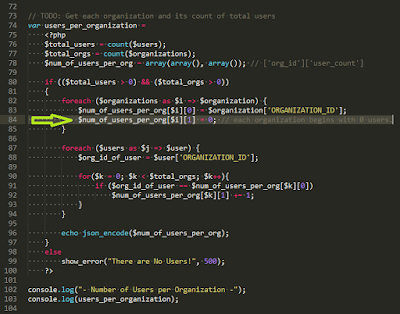
At last (within 5 minutes), I figured out that I need to initialize the 2nd array in my multi-dimensional array corresponding to 'user_count'. (See the light green arrow in my image below.)

Proof
After adding the code and rendering again in the browser, our results pass and the code works. Bingo!
 |
| Click on image to enlarge (see clearly) |
Nice Debugging Reference
Subscribe to:
Posts (Atom)