Tuesday, October 20, 2015

GitHub Auth Basics | Using Sinatra (RubyGem) | Installing Ruby - Part 2

Fam,

Ok, so I struggled yesterday with trying to get my simple Ruby application running in Sinatra locally according to GitHub's Authentication tutorial. See my struggle here on Part 1.

So, I had to start over and ensure my understanding of what was happening on my machine. This happened earlier today with reinstalling Ruby and Sinatra. See my victory and coding pleasure here. Lots of thanks to those who created the RubyInstaller project and gave great instructions on their GitHub wiki.

Now, I'm going to see how to continue my path with the GitHub Authentication tutorial.

I want to see if my Ruby application works now if I run "server.rb". This file is in my directory located at "C:\Users\[me]\RubyProjects\github-auth". I have a subfolder in here as well named "views" which contains the file "index.erb".

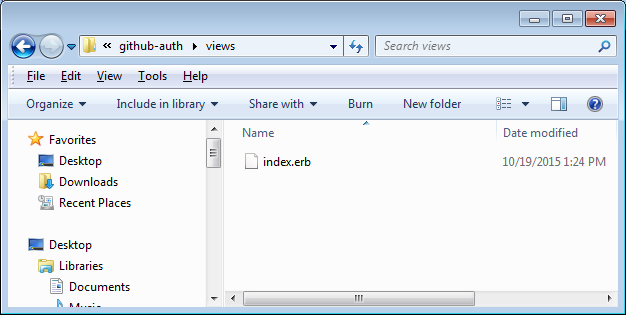

Code for "server.rb":
require 'sinatra'
require 'rest-client'
require 'json'

CLIENT_ID = ENV['GH_BASIC_CLIENT_ID']
CLIENT_SECRET = ENV['GH_BASIC_SECRET_ID']

get '/' do
  erb :index, :locals => {:client_id => CLIENT_ID}
end

Code for "index.erb":
<html>
  <head>
  </head>
  <body>
    <p>
      Well, hello there!
    </p>
    <p>
      We're going to now talk to the GitHub API. Ready?
      <a href="https://github.com/login/oauth/authorize?scope=user:email&client_id=<%= client_id %>">Click here</a> to begin!</a>
    </p>
    <p>
      If that link doesn't work, remember to provide your own <a href="/v3/oauth/#web-application-flow">Client ID</a>!
    </p>
  </body>
</html>

Installing the Gems

First, I know I need to ensure I have the libraries installed via "gem" considering they're called out in my "server.rb" file. Here are the libraries (or gems) that I'm talking about:
  • sinatra
  • rest-client
  • json
Here are the commands I enter in the Windows Command Prompt (but I'm skipping sinatra and json because I already installed these from previous blogs above):
> gem install sinatra --platform=ruby
> gem install json --platform=ruby
> gem install rest-client --platform=ruby

Here's the result:


Wow! No issue at all. Again, notice we're installing all the gems on Windows via Command Prompt (avoiding Cygwin).

Ok, let's go to the directory with the "server.rb" file and run it via Command Prompt. Oh no, I'm getting an error.


Troubleshooting a Gem (rest-client)

From searching for solutions on the Internet, I realized from this SO question (http://stackoverflow.com/questions/7964778/no-such-file-to-load-ffi-c-loaderror) that I might not have the library (gem) installed called "ffi". So, I run the following command:

>gem install ffi --platform=ruby


Yes, this resolved my issue!


Now we are becoming troubleshooting experts with Ruby while learning this Basic Authentication in GitHub - woohoo! Finally making progress.

GitHub Basic Authentication - Coding Foward

Now that our Sinatra application works, let's click on the "Click here" and see if we can continue to follow GitHub's instructions.


Since I didn't sign in yet, GitHub has a nice security setting that ensures I'm logged in before proceeding. I add in my credentials and sign in.


Yes, finally we are making progress with the GitHub Basic Authentication tutorial. The nice thing here is that we already added our GitHub Client ID and Client Secret into our GitHub stored application and as environment variables on my local machine. So when we did click on the link "Click here", the Sinatra server executed the code and automatically connected everything (values and online connection).

Now we need to continue with instructions from section "Providing a Callback".

Providing a Callback

I update my file "server.rb" according to the GitHub instructions and now my code looks like this:

require 'sinatra'
require 'json'
require 'rest-client'

CLIENT_ID = ENV['GH_BASIC_CLIENT_ID']
CLIENT_SECRET = ENV['GH_BASIC_SECRET_ID']

get '/' do
  erb :index, :locals => {:client_id => CLIENT_ID}
end

get '/callback' do
  # get temporary GitHub code...
  session_code = request.env['rack.request.query_hash']['code']
  
  # ... and POST it back to GitHub
  result = RestClient.post('https://github.com/login/oauth/access_token',
                      {:client_id => CLIENT_ID,
                       :client_secret => CLIENT_SECRET,
                       :code => session_code
                      },
                      :accept => :json)
  
  # extract the token and granted scopes
  access_token = JSON.parse(result)['access_token']
end

I restart my Sinatra (local ruby server) and re-run the "server.rb" file in order for the new code to take effect. In case, we forgot - Ctrl+C, then >ruby server.rb.

Excellent! We received a token from GitHub's API Authentication.
332bc61cc3579befef5cac7d9003350c51c7a870


Checking Granted Scopes

I now attempt the next section and add the code for checking the user scope. Strange. I get another error (to troubleshoot).


I had to update the code so I could understand it more (see final code below in screenshots). This took me some time to troubleshoot because I had to learn Ruby code to troubleshoot. =p Once fixed, this is the resulting screen:


Yep, a blank screen.

Making Authenticated Requests

Now that we have the scope granted for my user, let's access my private email. Notice, I check my email settings to be certain of my settings. I check in my personal settings and in my application's settings. I don't care about the generated tokens because my code will generate one based on my client ID and Secret related to my application called "basics-of-authentication".


So, I should be able to access my email address once my access is authenticated. I add in the code per GitHub's tutorial. Ugh, another error.


GitHub's authentication is so irritating. I'm running into another issue but this time related to my user authentication (user permissions because I'm able to get my user scope). Here's another way I tried checking (by pasting the line of code directly into the browser but without my token).


They're similar messages. So, my token must not be the issue. After quite a lot of troubleshooting, I finally updated the code (to by-pass getting the authenticated user information and instead getting user's public information). Notice this JSON results parses into a Hash Map.

Then, I get the emails and add into the Hash Map at key 'private emails'. Finally, pass the authenticated results as variable locals to the basic.erb file. This smooth flow finally displays the following screen.


Victory at last!

Here's an update that might be useful to know and I'm keeping for my records. :)
https://developer.github.com/changes/2014-04-08-reset-api-tokens/

My Code:  server.rb


Enjoy!

GitHub Auth Basics | Using Sinatra (RubyGem) | Installing Ruby

I want to follow this tutorial to understand how to further implement or use this GitHub Authentication. https://developer.github.com/guides/basics-of-authentication/

However, seems I need to use a quick Sinatra application. https://github.com/sinatra/sinatra-book/blob/master/book/Introduction.markdown#hello-world-application

I'm not sure what this is. In following the README file (or markdown), I'll need to install RubyGems.
https://rubygems.org/

To use RubyGems, seems I'll need to install Ruby.
https://www.ruby-lang.org/en/

To install Ruby on my local Windows machine, seems it'll be easiest with the Installer.
http://rubyinstaller.org/downloads/

While installing Ruby, I selected all 3 checkboxes (using ToolKit for GUI development, adding Ruby exe to PATH, and auto-launching .rb and .rbw files with Ruby). Finish the installation.


Here's where I installed my Gem and Ruby programs.


Here's how I checked my programs were installed correctly. Checking Ruby first, then RubyGems.


I most likely will want to leverage the Unix guidelines from GitHub. Since I'm on Windows, I'll use the Cygwin program tool.
NOTE: If you already have this program open, then you'll probably need to close and reopen the program so that Cygwin will refresh with the system environment variables.


Interesting, I ran into an issue where 'gem' command is not found in Cygwin. I found these articles to help me understand why.
http://stackoverflow.com/questions/3831131/rubygems-cygwin-posix-path-not-found-by-ruby-exe
http://blog.mmediasys.com/2008/10/27/handy-tip-dont-mix-one-click-installer-with-cygwin/

So, I install Ruby from within the Cygwin setup.


Run the commands again to see if RubyGems is now properly installed within Cygwin.
$ gem


Yes, fixed!

Now, I go back to GitHub's tutorial to continue (from Installation section).

Since I was a little confused on what all to install to get a basic Sinatra app running, I followed the instructions based on this quick tutorial. Mind you, I didn't know Ruby and had to watch the quick "Ruby for Newbies" screencast.
http://code.tutsplus.com/tutorials/singing-with-sinatra--net-18965

I created my "basics.rb" file in my new folder called "RubyProjects".


Next, I ran my file with Ruby from within my Cygwin (which I changed to RubyProjects directory).


Now I see the results in my browser as mentioned in the tutorial.


I'm not going to finish this 'tutsplus' tutorial since I understand the basics now. I' now I go back to GitHub's tutorial to continue (from Installation section). I update my file to look similar to the one in GitHub's tutorial.


To see these changes take effect, I enter command (while focus in Cygwin window):  Ctrl + C
And the Sinatra server should stop (i.e. shutdown).


Next, I re-run the same command ($ ruby basics.rb) and see the update in the browser (refreshed).


Yes, we finished this simple instruction/tutorial from the referenced Sinatra on GitHub.
https://github.com/sinatra/sinatra-book/blob/master/book/Introduction.markdown#hello-world-application

Now what? Let's look back at:  https://developer.github.com/guides/basics-of-authentication/

Seems GitHub tutorial is stating this is my app. Most likely it's referring to this app being registered in GitHub. So, I'll need to commit this app in my GitHub and then register this app.

For this example, I'll just create a public repo in my GitHub. (Be sure to add .gitignore for Ruby.)


Here it is @ https://github.com/gradney/basics-of-authentication
I'll clone this repo to my local, copy the "basics.rb" file into my local clone, update the file name to "server.rb" as mentioned in the tutorial, and then push/commit this up to my online GitHub repo.


I update the "server.rb" with the code in the section "Accepting User Authorization".
https://developer.github.com/guides/basics-of-authentication/#accepting-user-authorization

I also add the subfolder "views" with the file "index.erb" into my cloned folder. I commit to online repo.


I register my application according to GitHub tutorial.


In Cygwin, I navigate to the project folder and attempt to start this application in Sinatra server. But, didn't work. I stop and restarted, and still didn't work. One of my imports ('require' libraries is not recognized). I'll need to install this gem.

$ gem install rest-client

I get an error stating I need to install the development tools first. :(

I tried the following command, but this didn't work.
$ gem install bundler 

I found this online article and tied this command
$ curl -sSL https://get.rvm.io | bash -s stable

Still does not seem to be working.
I just might need to build my own native libraries. boo.
https://github.com/oneclick/rubyinstaller/wiki/Development-Kit#building-the-devkit


$ gem install json_pure   (successful!)
$ gem update (there are so many errors resulting from "The compiler failed to generate an executable file.")

Yep, I'm going to need to do something else here with Sinatra. Dang, why does GitHub only have a tutorial on GitHub Authentication using a quick app in Ruby (via Sinatra)??? Awwww.....being difficult. Use an app that's platform independent in tutorials....that's the lesson today.

Some helpful troubleshooting tips:

https://github.com/oneclick/rubyinstaller/wiki/Troubleshooting
http://collaborate.je/2014/08/setting-ruby-rails-windows-7-via-cygwin/
http://stackoverflow.com/questions/20688671/failed-to-build-gem-native-extension-on-windows-7-the-system-cannot-find-the
https://www3.ntu.edu.sg/home/ehchua/programming/cpp/gcc_make.html

Installing Ruby on Windows | Running Ruby basic app with Sinatra

Fam,

Yesterday was a very challenging day with trying to run a "basic" application in Ruby on Sinatra (local ruby server - I believe). However, I ran into quite a few issues because all of the examples I was looking at were using either a Mac or Linux. Well, that's nice - and very typical of a programmer. But, what about the millions who use Windows? I thought Ruby was independent of platform?

Anyhow, here's my new attempt to get the "basic" application in Ruby running on Sinatra on my local to continue using GitHub's Basic Authentication tutorial.

So, I'm NOT going to use Cygwin with Ruby anymore. This was probably one of the core issues. I strongly advise not wasting a whole day with figuring out how to run Ruby stuff in Cygwin.

Installing Ruby on Windows

I already installed Ruby with the quick installer and placed in my C: drive. Notice that Ruby developers advise NOT to install in a location where the path has spaces (e.g. "C:/Program Files"). I also already created a System Environment Variable called RUBY_HOME pointing to the Ruby location on C: drive and added this variable to the PATH.


Oh wait! After reading this following message on the Ruby Installer site, I'm going to uninstall Ruby 2.2.3 (x64) and install Ruby 2.2.3 (32bits) version.

The 64-bit versions of Ruby are relatively new on the Windows area and not all the packages have been updated to be compatible with it. To use this version you will require some knowledge about compilers and solving dependency issues, which might be too complicated if you just want to play with the language.

I am installing with all options. And then I click Finish.


I update my RUBY_HOME environment variable. I also notice that my User environment variable has Path to Ruby\bin location and there are extension pointing to it when a file extension recognized with *.rb or *.rbw. This must be from selecting the option labeled "Associate .rb and .rbw files with this Ruby installation.".

Here's my new command output of:  ruby -v


Now, I'm going to download the corresponding Development Kit for use with Ruby 2.0 and above (32bits version only). If you don't see it, then try scrolling down the page to see this section on Development Kit. Here's the webpage with instructions on this kit and its associated wiki.

When I run this, the program installer asks to extract to a location. So, I'm extracting to my "C:\Ruby22_Dev_Kit" folder (which I just created).

I'm following the instructions on the wiki, section "Quick start".


According to wiki's section "5. Test Installation", I'm going to see if my Ruby environment is correctly installed. Notice that I'm still using Windows Command Prompt to run these commands. I didn't see any instructions on using MingW or MSYS strangely. Well, that's because it's already included in the Ruby directory and Ruby uses the MinGW compiler.


Pay attention to the advice and instructions in the wiki's section "Example Native RubyGem Installations using the DevKit". I'd highlight "it's crucial that you include the --platform=ruby option to force RubyGems to build the native gem...".


That's it - victory!


Quick Test of Ruby (using IRB)

Let's test our Ruby installation with some basic commands. I'll leverage the quick tutorial by Ruby @ https://www.ruby-lang.org/en/documentation/quickstart/

IRB - Interactive Ruby

Now the tutorial says "If you're using Windows, open Interactive Ruby from the Ruby section of your Start Menu. BUT, you can open IRB from the command line using the following command:

>irb


That's it - victory!

Running Ruby basic app with Sinatra

Let's test running Sinatra on our machine now that we have Ruby properly installed. I'll be using this reference: http://www.sinatrarb.com/

Before I begin, I just want to make sure the server is not started or installed or anything with a simple call in the browser to Sinatra's default port:  localhost:4567


I created a directory for storing my Ruby Projects where I'll store my first Sinatra project.
Location looks like "C:\Users\[me]\RubyProjects\hi"

Based on the homepage of the Sinatra site, I'm adding the code into a pipe (i.e. file) called "hi.rb" and storing this file in folder ".../RubyProject/hi". Now I'm going to smoke it and see what happens.

1. Install the RubyGem "Sinatra" and remember to add the argument "--platform=ruby" as instructed by the RubyInstaller wiki (from above).


2. Navigate to the Ruby directory containing the "hi.rb" file and run the Ruby file.  > ruby hi.rb


We won't see the INFO response statements until we complete the next step. But, this is a good initial response so far.

3. Go back to the browser and refresh to see Sinatra running (per the 'require' statement in the ruby file) the "hi.rb" file. This should display a simple "Hello World" statement in the browser. But, we didn't get this. Instead, Sinatra kindly tells us what to code to try in order to see what we're expecting.


Let's update the code in our file "hi.rb" according to Sinatra's "try this" advice and then restart Sinatra by doing entering the following commands with focus in Command Prompt window:
Ctrl+C  (pressing these keys simultaneously to stop the Sinatra server from running)
>ruby hi.rb


Yes!, success!

That's it! In closing this practice, here's my code in the "hi.rb" file.

require 'sinatra'

get '/' do
  "Hello world, it's #{Time.now} at the server!"

end

This is why I have a little more than a simple "Hello World!" in my browser display. I hope this was helpful for you like this was for me.

God Speed,
G2

Thursday, October 15, 2015

Cygwin: More useful than Windows CLI for Unix comm, API interaction

Fam, here's another helpful article. When I was getting frustrated with trying to figure out how to execute GitHub's Getting Started API, I went through similar steps this sister went through. I hope this is helpful for you.

Quick Tutorial:
http://hariniachala.blogspot.com/2012/08/running-curl-commands-in-command-prompt.html


If you need help installing Cygwin, here's a good article I think.
http://www.howtogeek.com/howto/41382/how-to-use-linux-commands-in-windows-with-cygwin/

Some other helpful articles (Unix command line tips):
http://lifehacker.com/5633909/who-needs-a-mouse-learn-to-use-the-command-line-for-almost-anything
http://www.voxforge.org/home/docs/cygwin-cheat-sheet
http://x.cygwin.com/docs/ug/cygwin-x-ug.pdf
http://cs.calvin.edu/courses/cs/112/resources/eol/ (end-of-line char)